Tutorial to create a pretty cool, simple, horizontal CSS menu
Posted on April 18th, 2008 by aravind | 39 Responses Share
This is a beginner level tutorial to create a horizontal CSS menu. Many of the beginners are not aware how simple is to create a pure CSS menu. This tutorial helps to create a simple and attractive CSS menu with a cool hover effect. Check out the demo below..
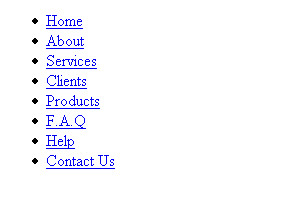
First of all let us write HTML list for menu. Say we have 8 links, as shown in image, here goes the code..
<ul id=”button”>
<li><a href=”#”>Home</a></li>
<li><a href=”#”>About</a></li>
<li><a href=”#”>Services</a></li>
<li><a href=”#”>Clients</a></li>
<li><a href=”#”>Products</a></li>
<li><a href=”#”>F.A.Q</a></li>
<li><a href=”#”>Help</a></li>
<li><a href=”#”>Contact Us</a></li></ul>

Now, lets go the CSS part, We used only one ID name here to write CSS code. That is ‘button.’
#button {
padding: 0;
}
The CSS code above will remove the padding which will be there in default for list elements.
I am going to create a horizontal menu now, so lets make the list inline
#button li {
display: inline;
}

Okay, now lets make it look beautiful by adding some styles for anchor tag
#button li a {
font-family: Arial;
font-size:11px;
text-decoration: none;
float:left;
padding: 10px;
background-color: #2175bc;
color: #fff;
}

Lets make it more attractive by giving hover effects, we are here going to give a special hover effect
#button li a:hover {
background-color: #2586d7;
margin-top:-2px;
padding-bottom:12px;
}

Yeah..! its done! see how simple is to create a CSS menu… A demo..? CLICK HERE!
And don’t forget, if you don’t have a blog, then get one started now. I recommend WP Web Host for all your Wordpress hosting needs. But if you want to get regular, good hosting or some cheap hosting, I recommend WHS.
but where exactly do you put it?
Well done. You did a great job of preserving the SEO benefits of the hrefs, no fancy-schmancy Javascript necessary. Woo!
Hi,
This is fantastic, however I can’t work out how to place it in the centre of a page and to have a background the same colour that stretches all the way across the page.
So the menu is always dead centre, no matter what screen size and it appears to stretch right across the page.
Thanks for your help
Nice effect…worth my 5 minutes…good work!
very cool tutorial – enjoyable and not overly complex. I learned a few things.
It would be nice to see the finished product somewhere on this page instead of having to download it (nice to have the download, however).
I like it.
Thanks Boss…
I have learnt because of you that how to do simple css menu….
Regards
Sankar
Cool Tip. I would like to use this into my blog.
Thanq
@krishna, nice! I’m very glad to know that this beginner level tutorial helped many..
@Aravind
This post has caught up more responses coz the level and ease of presentation of the information from you is good. Its easy to understand and looks like a good tip for SEO’s too. I will certainly keep looking yours website for some more tips n tweaks from you
One suggestion if you can take up here…i would say try to post more information on CSS related information for better designing and importance of CSS for code optimization as you are already into designing.
CSS in SEO that is certainly an interesting point i will be looking for being an SEO professional.
Lets stay Connected !!!
Excelent!!!
Use of CSS Realy nice
Hi,
Nice menu, but i guess it doesn’t works in IE6……any solution???
Poonam
@Poonam: It works perfectly with IE6.. Consider checking it in the HTML file I have posted with.. [ http://72.18.130.22/~thedesig/wp-content/uploads/2008/04/css_menu.html ]
Fantastic!